📊 SQL Basics — SELECT, INSERT, UPDATE, DELETE & JOINs
⏱️ 10–12 min read · 🎯 Beginner · 📚 Part 14 of 20 👉 Missed Part 13? Database Fundamentals — SQL vs NoSQL
🤔 From Theory to Syntax
Part 13 explained why SQL databases work the way they do. This post gets your hands on the keyboard — actual SQL syntax you will write every day: SELECT, INSERT, UPDATE, DELETE, and JOIN.
By the end, you will be able to read almost any SQL query you encounter in a codebase, and write your own from scratch.
🗂️ Tables, Rows, and Columns
Every SQL database organizes data into tables. Think of a table like a spreadsheet with strict rules.
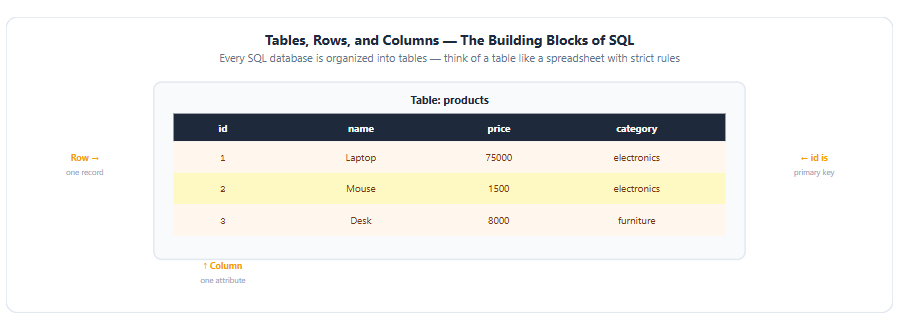
Table structure — rows, columns, and primary key annotated
Table: products

| id | name    | price | category    |
|----|---------|-------|-------------|
| 1  | Laptop  | 75000 | electronics |
| 2  | Mouse   | 1500  | electronics |
| 3  | Desk    | 8000  | furniture   |
A column is one attribute — every row has a
name, aprice, acategoryA row is one complete record — one specific product
The primary key (
idhere) uniquely identifies each row — no two rows can share the same primary key
🔍 SELECT — Reading Data
SELECT is how you read data. It is the most common SQL statement you will write.
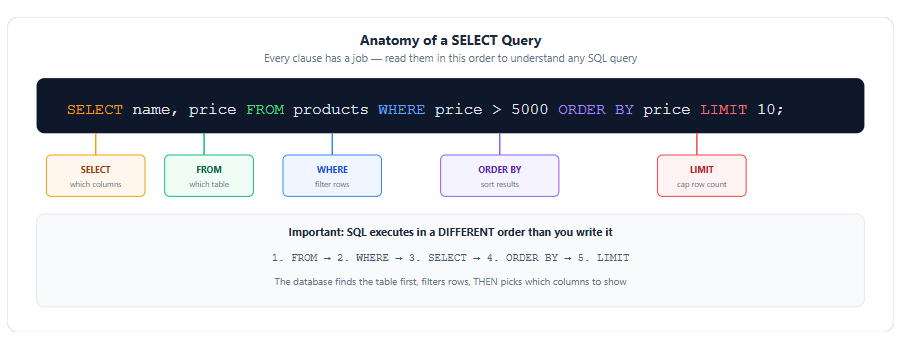
Anatomy of a SELECT query with execution order
SELECT name, price
FROM products
WHERE price > 5000
ORDER BY price
LIMIT 10;
Reading this left to right: get the name and price columns, from the products table, only rows where price is over 5000, sorted by price, and cap it at 10 results.
💡 Important detail: SQL executes in a different order than you write it. The database processes
FROMfirst (find the table), thenWHERE(filter rows), thenSELECT(pick columns), thenORDER BY, thenLIMIT. Understanding this order helps you reason about why certain queries work and others do not.
Common SELECT patterns:
-- Get everything
SELECT * FROM products;

-- Get specific columns only
SELECT name, price FROM products;

-- Filter with WHERE
SELECT * FROM products WHERE category = 'electronics';

-- Multiple conditions
SELECT * FROM products WHERE price > 1000 AND category = 'electronics';

-- Sort — ASC is default, DESC for descending
SELECT * FROM products ORDER BY price DESC;

-- Count rows
SELECT COUNT(*) FROM products WHERE category = 'electronics';

-- Remove duplicates
SELECT DISTINCT category FROM products;
✍️ INSERT — Creating Data
INSERT adds a new row to a table.
INSERT INTO products (name, price, category)
VALUES ('Keyboard', 3500, 'electronics');
You specify the column names, then the matching values in the same order. Columns you omit either use a default value or must allow NULL.
-- Insert multiple rows in one statement
INSERT INTO products (name, price, category) VALUES
  ('Monitor', 15000, 'electronics'),
  ('Chair', 6000, 'furniture');

-- Insert and immediately return the new row (PostgreSQL)
INSERT INTO products (name, price) VALUES ('Webcam', 2500)
RETURNING id, name;
🔧 UPDATE — Changing Data
UPDATE modifies existing rows.
UPDATE products
SET price = 70000
WHERE id = 1;
You can update multiple columns in one statement:
UPDATE products
SET price = 70000, category = 'premium-electronics'
WHERE id = 1;
🗑️ DELETE — Removing Data
DELETE removes rows from a table.
DELETE FROM products
WHERE id = 2;
⚠️ The Most Dangerous Mistake in SQL
UPDATE and DELETE share one critical trait — without a WHERE clause, they apply to every single row in the table.
The dangerous missing WHERE mistake vs safe practice
-- ⚠️ DANGER — no WHERE clause
DELETE FROM products;
-- This deletes EVERY row in the table. Permanently. No confirmation.

UPDATE products SET price = 0;
-- This sets EVERY product's price to 0.
A single missing keyword can wipe out an entire production table. This is one of the most common causes of real production incidents — someone runs an UPDATE or DELETE without realizing the WHERE clause got dropped or mistyped.
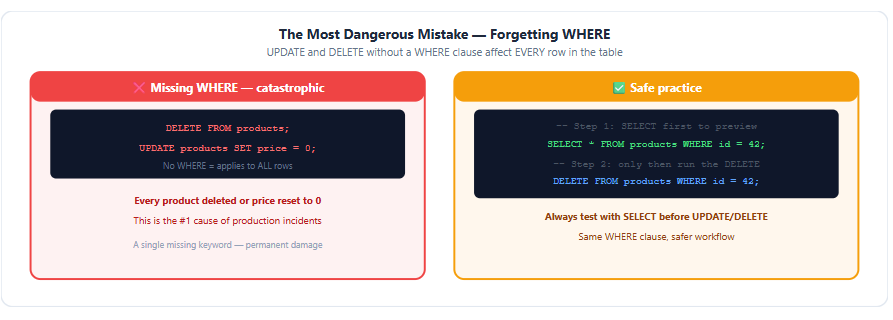
The safe workflow:
-- Step 1: run the SAME condition as a SELECT first, to preview what will be affected
SELECT * FROM products WHERE id = 42;

-- Step 2: only after confirming the result looks right, run the actual DELETE
DELETE FROM products WHERE id = 42;
💡 Always test destructive statements with SELECT first. Copy the exact
WHEREclause you plan to use in yourUPDATEorDELETE, run it as aSELECT, look at the rows it returns, and only then swapSELECT *forDELETE FROM table_nameorUPDATE table_name SET ....
🔗 Primary Keys and Foreign Keys — Connecting Tables
Real applications rarely use just one table. A users table and an orders table need to relate to each other — every order belongs to a specific user.
Primary key and foreign key relationship between users and orders tables
Table: users                    Table: orders
| id (PK) | name    |          | id  | user_id (FK) | total  |
|---------|---------|          |-----|--------------|--------|
| 42      | Rajaram |          | 501 | 42           | 75000  |
| 43      | Priya   |          | 502 | 42           | 1500   |
id in the users table is the primary key — a unique identifier for each row. user_id in the orders table is a foreign key — it points back to users.id, establishing that both orders belong to user 42.
-- Creating this relationship in SQL
CREATE TABLE orders (
  id SERIAL PRIMARY KEY,
  user_id INTEGER REFERENCES users(id),
  total NUMERIC(10,2)
);
This relationship is exactly what makes JOIN queries possible.
🔀 JOIN — Combining Data From Multiple Tables
A JOIN lets you query across two related tables in a single statement.
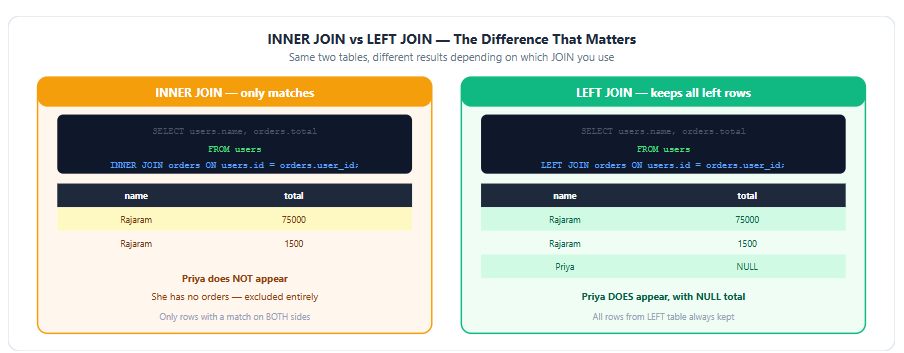
INNER JOIN — only rows that match on both sides:
INNER JOIN vs LEFT JOIN comparison with real results
SELECT users.name, orders.total
FROM users
INNER JOIN orders ON users.id = orders.user_id;

-- Result:
-- Rajaram | 75000
-- Rajaram | 1500
-- (Priya does NOT appear — she has no orders)
LEFT JOIN — all rows from the left table, even without a match:
SELECT users.name, orders.total
FROM users
LEFT JOIN orders ON users.id = orders.user_id;

-- Result:
-- Rajaram | 75000
-- Rajaram | 1500
-- Priya   | NULL     ← she still appears, with NULL where there's no order
The key difference: INNER JOIN excludes rows with no match on either side. LEFT JOIN keeps every row from the left (first) table regardless, filling in NULL for columns from the right table where there is no match.
-- RIGHT JOIN — the mirror of LEFT JOIN, all rows from the right table
SELECT users.name, orders.total
FROM users
RIGHT JOIN orders ON users.id = orders.user_id;

-- FULL JOIN — all rows from both tables, NULL wherever there's no match
SELECT users.name, orders.total
FROM users
FULL JOIN orders ON users.id = orders.user_id;
In practice, INNER JOIN and LEFT JOIN cover roughly 90% of real-world queries. RIGHT JOIN is rarely used because you can always rewrite it as a LEFT JOIN by swapping the table order.
💻 Running SQL From Your Terminal — psql
Every DevOps engineer needs to query a database directly, without opening a GUI tool.
psql terminal commands — connecting and running queries
# Connect to a PostgreSQL database
psql -h your-db-host.rds.amazonaws.com -U your-user -d your-database

# Useful meta-commands once connected (all start with backslash)
\dt              -- list all tables
\d products      -- describe a table's columns and types
\q               -- quit psql

# Run a query directly from the command line (great for scripts)
psql -h host -U user -d db -c "SELECT * FROM products LIMIT 5;"

# Run an entire .sql file
psql -h host -U user -d db -f setup.sql
# Connecting to your RDS instance specifically
psql -h your-instance.abc123.ap-south-1.rds.amazonaws.com \
     -U postgres \
     -d mydb \
     -p 5432
🛠️ Hands-On Lab
# Create a table and populate it
CREATE TABLE users (
  id SERIAL PRIMARY KEY,
  name VARCHAR(100),
  email VARCHAR(100)
);

CREATE TABLE orders (
  id SERIAL PRIMARY KEY,
  user_id INTEGER REFERENCES users(id),
  total NUMERIC(10,2)
);

INSERT INTO users (name, email) VALUES
  ('Rajaram', 'raj@example.com'),
  ('Priya', 'priya@example.com');

INSERT INTO orders (user_id, total) VALUES
  (1, 75000),
  (1, 1500);

-- Try INNER JOIN — Priya should not appear
SELECT users.name, orders.total
FROM users INNER JOIN orders ON users.id = orders.user_id;

-- Try LEFT JOIN — Priya SHOULD appear with NULL
SELECT users.name, orders.total
FROM users LEFT JOIN orders ON users.id = orders.user_id;

-- Practice the safe delete workflow
SELECT * FROM orders WHERE total < 2000;
DELETE FROM orders WHERE total < 2000;
📖 Quick Reference
SQL cheat sheet — clauses, JOIN types, psql commands
| Concept | Plain English |
|---|---|
| SELECT | Read rows from a table |
| INSERT | Create a new row |
| UPDATE | Change existing rows — always use WHERE |
| DELETE | Remove rows — always use WHERE |
| WHERE | Filter which rows are affected |
| ORDER BY | Sort results — ASC (default) or DESC |
| LIMIT | Cap the number of rows returned |
| Primary Key | Unique identifier for each row in a table |
| Foreign Key | Column that points to a primary key in another table |
| INNER JOIN | Only rows that match on both tables |
| LEFT JOIN | All rows from the left table, NULL if no match |
\dt |
psql command — list all tables |
\d tablename |
psql command — describe a table's structure |
✅ What You Learned Today
✅ Tables have rows (records) and columns (attributes) — the primary key uniquely identifies each row
✅ SELECT reads data, INSERT creates, UPDATE modifies, DELETE removes — this is CRUD in SQL
✅ SQL executes as FROM → WHERE → SELECT → ORDER BY → LIMIT, not the order you write it
✅ UPDATE and DELETE without WHERE affect every single row — always test with SELECT first
✅ A foreign key in one table references a primary key in another — this is how tables relate
✅ INNER JOIN only returns matching rows on both sides
✅ LEFT JOIN keeps every row from the left table, using NULL where there is no match
✅ psql lets you connect to and query PostgreSQL directly from your terminal
✅ \dt lists tables, \d tablename describes a table's structure
📚 References
⏭️ Up Next — Part 15: SQL for DevOps — Queries You'll Actually Run in Production 🔧
You now know standard SQL syntax. Part 15 goes further — the specific queries DevOps engineers run in production: checking table sizes, finding slow queries, monitoring connection counts, and using EXPLAIN ANALYZE to debug performance issues.